Biamp Workplace Software Tools Overview
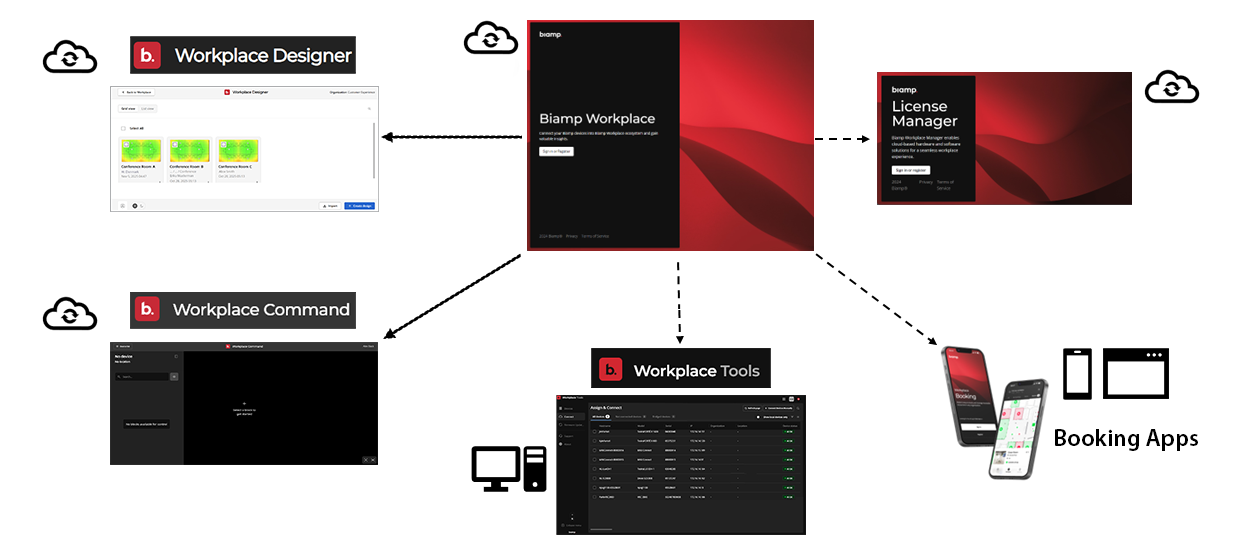
Biamp Workplace Administrative Portal: The Admin Portal is the hub of Biamp Workplace and has two major components.
- Landing page - The admin portal landing page is where all users, including Workplace organization owners and admins, create their Biamp Workplace accounts.
- Organization Consoles - Each organization has an console in the portal. Users with administrative or owner rights in an organization can use the console to build the organization, create locations in it, assign licenses, create interactive floor plans and display screens, monitor and manage devices, as well as add and manage new organization members. End-users in the organization cannot view these admin features, but can access booking functions through the console.
Biamp Workplace Booking app: A mobile and web-rendered browser app that enables all Workplace users to find and book Workplace organization rooms, desks, and parking spaces. This is the primary tool for end-users to interface with the Biamp Workplace system, along with Naso touch control room panels.
The mobile version of the app also allows owner and admin users to discover and add booking management devices to a Workplace organization.
Workplace Command app: A web-app in the Workplace admin portal that enables admin-users to send settings commands to Command-enabled devices, such as Tesira AV device block settings as well as Qt X controller Zone settings.
Biamp Workplace Tools Desktop app: The Workplace Tools desktop application allows admins and owner users to discover and add Workplace-supported audiovisual devices and bridges to a Workplace organization. This includes an option for manually adding devices not on the same subnet that Tools is connected to. Additionally, the app provides options to manage settings and firmware for supported devices, including devices that have not been assigned to a Workplace organization. The Biamp Workplace Tools desktop app is available for Windows and macOS devices.
Please Note: The desktop Workplace Tools app replaces the deprecated Workplace Connect app.
Biamp Workplace Designer app: Workplace Designer is a web application tool for creating audiovisual system plans for conference and meeting rooms. Designer provides tools for creating spaces, defining their acoustic properties, and then populating each space with audiovisual devices, optimizing their placement for sound quality. The Workplace Designer app is accessed through the app launcher menu in the top bar of most Workplace portals and apps.
Biamp Workplace Control Designer: The successor to the Biamp Canvas desktop application, Control Designer is a web application tool for creating custom control interfaces using drag-and-drop UI design and node-based logic programming. Workplace Control Designer is accessed through the app launcher menu in the top bar of most Workplace portals and apps.
Biamp Workplace License Manager web portal: This stand-alone portal allows authorized resellers and distributors to purchase and transfer licenses to customers' Workplace organizations. Please note, access to the license portal requires a Biamp Workplace account.
Biamp Workplace Tools (Voltera Moble app): An NFC-reader mobile app for locating Voltera devices and reading their status.