Workplace Tools Impera Migration
Allows Connect-X MP6 devices running firmware v3.33 (less than v3.9) to be updated to 5.0 to allow them to be configured in Workplace Control Designer.
Connect-X MP6 devices running v3.9 and visible in Workplace can also be updated to v5.0 using this method, or they can have their firmware updated via the regular firmware update process in Workplace.
- This is a non-reversible action – the MP6 will not be programmable using Project Designer, but will be able to be viewed, configured and controlled in Workplace.
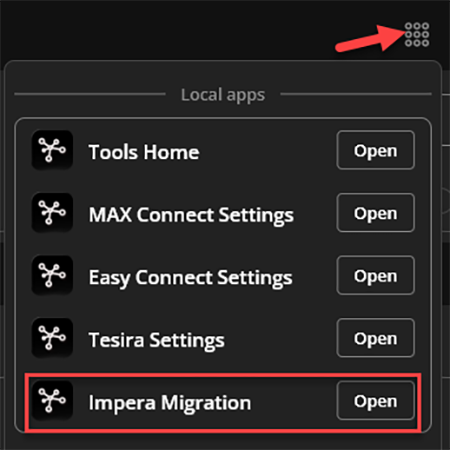
Choosing this option brings up a device list of the Impera Devices on the network – choose an Impera device to be updated. The hostname will be the serial number.
- Click on that device, choose Update firmware.
- A window will pop up noting that this is a non-reversible process.
- Choose the version (from the cloud list
- Press Update
- The device screen will return showing the update progress. (install firmware, apply update, reboot)
- Once the update has been applied and the device rebooted it can be registered to the Workplace Org.
The device has some editable fields – add a description that will appear in WP, edit time zone, NTP time (default time.biamp.com will remain as backup), Network settings (DHCP toggle to allow static address), and determine Locate duration. If you change locate duration the device will blink actively for that period.