Biamp Workplace Overview
In a hurry to get started? Please see our Getting Started with Biamp Workplace procedure articles.
What is Workplace?
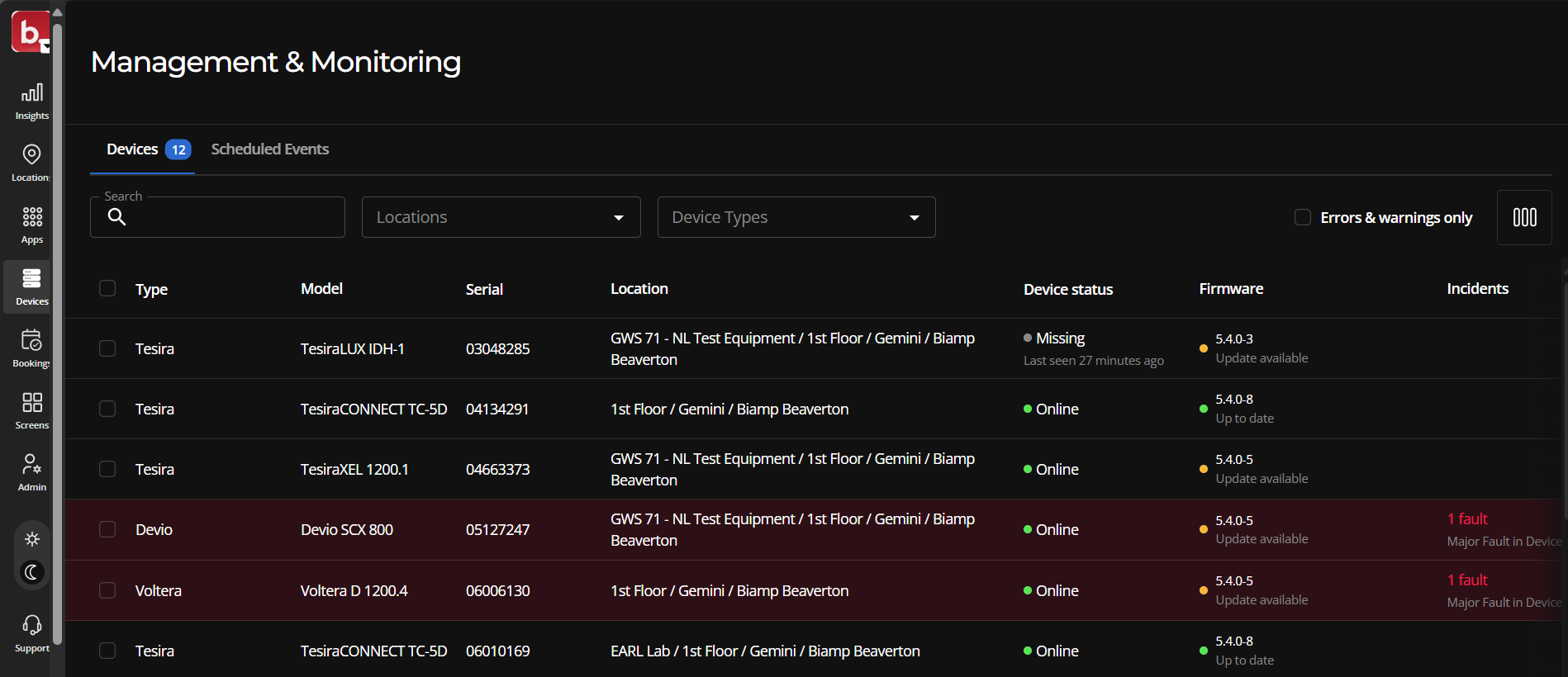
Biamp Workplace is a cloud-based platform that allows you to create organizations for monitoring and managing audiovisual devices and space-booking systems that reserve working desks, meeting rooms, and more. These organizations are built around locations where your Biamp AV and booking devices are installed.
Organizations
Once an organization is established, devices are connected, and location licenses are assigned, you can:
-
Monitor and manage connected Biamp audiovisual and meeting or work-space booking devices. This includes:
-
Remotely rebooting devices individually or in batches
-
Remotely updating firmware
-
Remotely viewing status and events, and more
-
Send commands to Workplace Command-supported devices
-
-
Manage location licenses that enable monitoring, managing, and booking functions.
-
Configure booking options and parameters for booking resources.
-
Manage booking events in the organization.
-
Design acoustically optimized meeting and conference room layouts and equipment sets.
-
Design locations and room plans, try out Workplace functions and features in a sandbox organization.
- Create user aids such as map screens that show the locations and status of bookable spaces and descriptions of each space and its features.
-
Add or remove locations, devices, and licenses to match your Workplace organization to your changing physical locations and hardware systems.
-
Add or remove users and admins as the organization's membership changes.
Biamp Workplace software tools
Most Biamp Workplace portals and web apps can be accessed using the Apps launcher control found in the navigation ribbon at the top of Biamp Workplace web apps and portal interfaces.
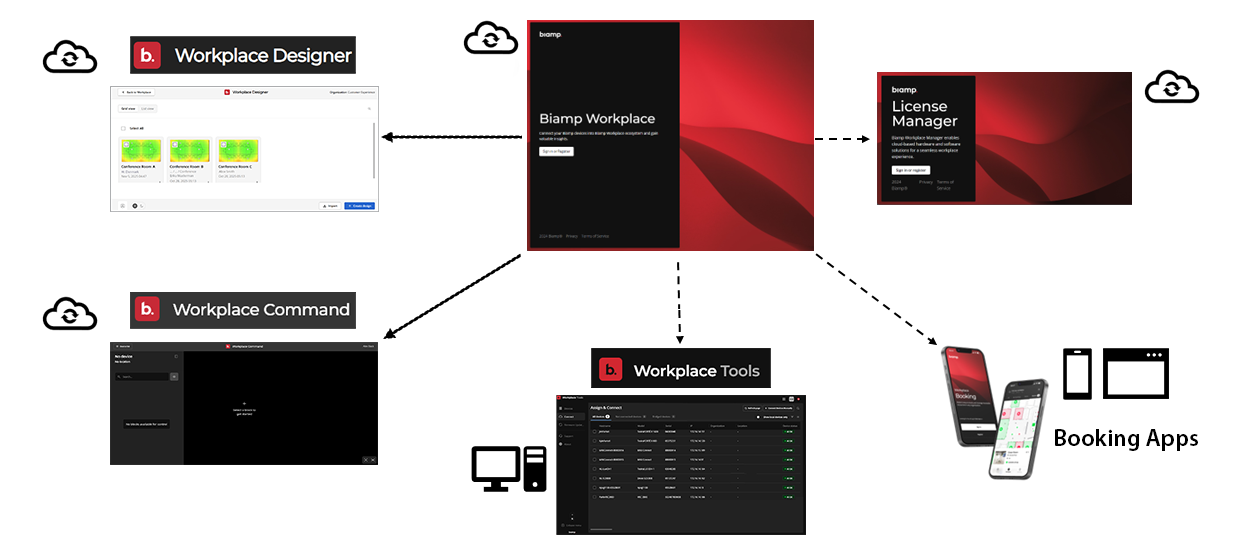
Biamp Workplace Web Portal: The Workplace Web Portal is the hub of the Biamp Workplace system, providing user-account management functions for all users as well as organization consoles for administering organizations. The portal also provides access to end-user functions in a browser environment as well as a sandbox and design space for Workplace organizations and physical equipment layouts.
Biamp Workplace Booking apps: A mobile app and a web app that enable end-users to book rooms, desks, and parking spaces. The mobile app also provides booking device discovery and assignment functions for administrative users.
The mobile Biamp Workplace Booking app and onsite-control panels are the primary user interfaces for Biamp Workplace end-users.
Workplace Command app: A web-app in the Workplace Web Portal that enables admin-users to send settings commands to Command-enabled audiovisual devices.
Biamp Workplace Tools desktop app: A desktop application for administrator users to discover and add Workplace-supported audiovisual and bridge devices to a Workplace organization. Workplace Tools also provides device management options for supported Biamp AV devices, including for devices assigned to Workplace organizations as well as unassigned devices.
Note: Biamp Workplace Tools replaces the deprecated Workplace Connect app.
Biamp Workplace Designer app: An administrator web app tool in the Biamp Workplace Web Portal portal used to create audiovisual system plans for conference and meeting rooms.
Biamp Workplace Control Designer: A user-interface design web app for creating end-user UI for audiovisual device control systems. This is Biamp's successor to Biamp Canvas.
Biamp Workplace License Manager Web Portal: This stand-alone portal allows authorized resellers and distributors to purchase and transfer licenses to customers' Workplace organizations.
Biamp Workplace Tools mobile Voltera app: An NFC-reader mobile app for locating Voltera devices and reading their status.
For more in-depth information, see: Workplace Software Tools Overview.
How-it-works overview
Are you setting up a Workplace organization?
Please see the Getting Started overview for a overview of how to create and build out a Biamp Workplace organization.
Will you run or administer an existing organization?
-
Create an account in the Biamp Workplace admin portal and sign in.
-
Ask the organization owner for an invitation to the organization. They will need the email address you used when creating your Workplace account to invite you to the organization and set a role for you.
-
Familiarize yourself with the Workplace portal and the console's user interface. This includes the Biamp Workplace Command app if you will be managing Tesira devices at the software block level.
-
Download and install the Biamp Workplace Booking mobile app to discover and add booking devices to the organization and admin them.
-
Download and install the Biamp Workplace Tools desktop app to discover and add audiovisual devices to the organization.
You can now manage and monitor devices connected to the system, configure them, manage users and licenses, and add new booking and AV devices.
Will you resell Biamp Workplace location licenses to customers?
Biamp sells Workplace licenses through authorized resellers. If you would like to become a distributor or reseller, see the Workplace License Manager Portal overview topic.
Workplace-supported product families
For compatibility details about supported products, please click on the links below. For more information about compatible products, see Workplace Supported Products.
Booking device families
- Evoko
Audiovisual device families
- Impera
- Modena
- Parlé
- Tesira
- Voltera
Internet gateway bridges
- Biamp Workplace Devices
Biamp Workplace Functions
For a detailed list of functions, see: Major Functions Overview.
Acquiring Licenses for an Organization
Licenses for organizations are purchased from authorized Biamp resellers. To find an authorized reseller and obtain a quote, please fill out the form found on the Biamp website page: Get a Quote or Find a Reseller
For more information on purchasing, what licenses do, assigning, and where purchased licenses can be found in the Biamp Workplace admin portal, see Acquiring Licenses for an Organization.
Available integrations
All control and monitoring functions in the Biamp Workplace administrative portal can be integrated into third-party systems using Biamp's library of GraphQL APIs. For more information, please see Biamp's Cornerstone technical support site: Integrations for Biamp Workplace
Procedures and guides for getting started
For detailed procedures on how to set up and populate a new Biamp Workplace organization, see Getting Started with Biamp Workplace.
Operation Procedures
For articles on managing and growing existing Workplace organizations, see the Operating Biamp Workplace section of this help system.
Function Locations in the Biamp Workplace Web Portal
Please see the Biamp Workplace Web Portal Function Locations topic.